Showing posts with label image tools. Show all posts

Saturday, January 22, 2022

2 Cool Tools: Cleanup.pictures and ClipDrop


Even if you are not a graphic designer, you probably need to occasionally "tweak" images for your work -- tasks like simply removing backgrounds or removing individual objects from photos.

To that end, allow me to recommend two tools, Cleanup.pictures and ClipDrop.

Cleanup.pictures is an intuitive online tool that lets you remove objects, people, text, or defects from images.



ClipDrop actually uses AR (Augmented Reality) to allow you to accurately remove the backgrounds from photos you take, or existing photos on your device.  ClipDrop then lets you drop the clean image directly onto your desktop -- which is super cool!
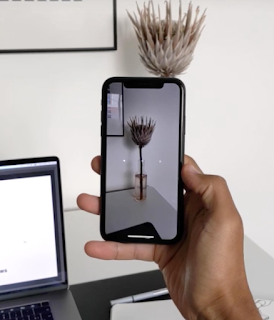


I hope you enjoy exploring these tools.  Which "cool tools" do you use to help your workflow?  Let us know in the "Comments" section below!


Don't miss out on any ExhibiTricks posts! It's easy to get updates via email or your favorite news reader. Just click the "Sign up for Free ExhibiTricks Blog Updates" link on the upper right side of the blog.

Paul Orselli writes the posts on ExhibiTricks. Paul likes to combine interesting people, ideas, and materials to make exhibits (and entire museums!) with his company POW! (Paul Orselli Workshop, Inc.) Let's work on a project together!

If you enjoy the blog, you can help keep it free to read and free from ads by supporting ExhibiTricks through our PayPal "Tip Jar"

Thursday, December 8, 2016

How Do You Use Pinterest In Your Design Work?


Pinterest is a great visual tool (organized into "boards" of images linked to websites) for museum/exhibit/design folks.

I'd like to gather your recommended Pinterest boards (as well as your Pinterest tips and tricks) for a future ExhibiTricks post (and free downloadable document) that can serve as a Pinterest compendium and resource.

One great way to use Pinterest is as a place to gather images and inspirations for projects in process (here's an example Pinterest board for a dinosaurs exhibition I'm working on.)

Pinterest can also be a great resource when looking for examples of interesting exhibition designs or ideas.  The indefatigable Elaine Gurian has a fantastic Pinterest site called "Museum Educator" that has a number of thematic boards related to topics such as "Museum Architecture" and "Label Ideas."

Another Pinterest favorite is the "Recognition" board which has super examples of donor recognition signage (with a bit of wayfinding, too!)

So click on over to Pinterest for some  inspiration, and then tell us about your favorite museum/exhibit/design Pinterest boards, as well as your best Pinterest tips and tricks, in the "Comments" section below.


Don't miss out on any ExhibiTricks posts! It's easy to get updates via email or your favorite news reader. Just click the "Sign up for Free ExhibiTricks Blog Updates" link on the upper right side of the blog.

P.S. If you receive ExhibiTricks via email (or Facebook or LinkedIn) you will need to click HERE to go to the main ExhibiTricks page to make comments or view multimedia features (like videos!)

Sunday, February 22, 2015

Creative Design Toolbox: The Public Domain Project


Pond5 has created an important resource for designers and developers, called The Public Domain Project.

As the name implies, the site provides photos, illustrations, video footage, effects, and 3D models that are all in the public domain (which means FREE to use!)  Instead of searching the archives of NASA, The Library of Congress, museums, and countless other online collections, The Public Domain Project brings it all together in one easily searchable site.

The Public Domain Project also has created searchable collections, sorted into topics such as military, space, classic sports, and fashion and style.

So if you work on projects that require media of different sorts, click on over to The Public Domain Project to learn more!


Don't miss out on any ExhibiTricks posts! It's easy to get updates via email or your favorite news reader. Just click the "Sign up for Free ExhibiTricks Blog Updates" link on the upper right side of the blog.

P.S. If you receive ExhibiTricks via email (or Facebook or LinkedIn) you will need to click HERE to go to the main ExhibiTricks page to make comments or view multimedia features (like videos!)

Thursday, March 13, 2014

Cool Museum Exhibit Design Tool: Spoonflower


Spoonflower is one of those cool Web-based service sites that lets you turn your ideas into real stuff!

It's also a great example of how the intersection of the Web and the Maker Movement can trickle down to serve museum folks and exhibit designers.

Spoonflower gives individuals the power to print their own designs (like the one above) on fabric, wallpaper or gift wrap. The idea is that you upload a digital image (or use the Spoonflower imaging tools) to the Spoonflower Web site and the company prints the design on a range of materials that they then ship directly to you.

You can see some real-life examples and read commentary on using different materials and techniques on the Spoonflower blog.  (Or vote in their weekly "Design of the Week" challenge!)

All in all, Spoonflower's services look like another interesting tool to add to the exhibit developer's repertoire. 

So why not give Spoonflower a try, and then email us a picture of what you made?


Don't miss out on any ExhibiTricks posts! It's easy to get updates via email or your favorite news reader. Just click the "Sign up for Free ExhibiTricks Blog Updates" link on the upper right side of the blog.

P.S. If you receive ExhibiTricks via email (or Facebook or LinkedIn) you will need to click HERE to go to the main ExhibiTricks page to make comments or view multimedia features (like videos!)

Thursday, September 15, 2011

Exhibit Design Toolbox: babyCAD


I'm all for FREE tools that help exhibit designers, so let me commend babyCAD to your attention.

BabyCAD is an online tool that lets you intuitively create exhibit installations.   It's clear that right now babyCAD is geared more toward trade show and pop up exhibits, but that being said, I really liked how quickly and intuitively I could knock together a respectable rendering with multiple exhibit elements.

The babyCAD program allows you to choose from a set of items arranged by categories that you can adjust to fit particular exhibit and display situations.  Two additional features that I like are the ability to add "skins" (like logos or artwork) to selected elements, as well as the ability to save your creations (that you want to share with clients) as either a PDF or a custom Web link.  The Web link is a URL that allows clients to control all the 3D-viewing aspects of your exhibit rendering in babyCAD without editing capabilities.

If you need to design kiosk-based or portable installations in your institution, babyCAD is well worth a look.

So what are you waiting for? Go to the babyCAD website and give it a whirl!


Don't miss out on any ExhibiTricks posts! It's easy to get updates via email or your favorite news reader. Just click the "Sign up for Automatic ExhibiTricks Blog Updates" link on the upper right side of the blog.

P.S. If you receive ExhibiTricks via email (or Facebook or LinkedIn) you will need to click HERE to go to the main ExhibiTricks page to make comments or view multimedia features (like videos!)

Wednesday, July 28, 2010

Photovisi


The Photovisi folks have developed a free and easy way for people to make photo collages online, and they'd like ExhibiTricks readers to try Photovisi out and give them feedback as well.

The process is easy and the Photovisi site offers several creative templates and options to try.

First, you choose a template. Next, you add photos to make it unique, with options to rotate and resize images however you like. Finally, once the collage is done, it can be downloaded and shared with the world.

It's definitely a specialized online tool, but it just might come in handy for your future museum graphic or presentation projects!


Don't miss out on any ExhibiTricks posts! It's easy to get updates via email or your favorite news reader. Just click the "Free Updates" link on the right side of the blog. P.S. If you receive ExhibiTricks via email (or Facebook or LinkedIn) you will need to click HERE to go to the main ExhibiTricks page to make comments or view multimedia features (like videos!)

Wednesday, July 15, 2009

Pictaculous: Great Free Design Tool


The fine folks at MailChimp have released a free graphic design tool called Pictaculous.

Simply plug an image into Pictaculous, and different sets of compatible color palettes are generated. A nice little tool to help you with your print or web projects!

Try it out for yourself on the Pictaculous website.

Don't miss out on any ExhibiTricks posts! It's easy to get updates via email or your favorite news reader. Just click the "Free Updates" link on the right side of the blog.

P.S. If you receive ExhibiTricks via email you will need to click HERE to go to the main ExhibiTricks page to make comments or view multimedia features (like movies!)

Thursday, April 17, 2008

Exhibit Geek Paraphenalia: Spy Camera Sunglasses


It is disappointing when entering a museum exhibition to encounter an oppressively-worded sign warning you not to take pictures inside.

Certainly some objects should not be subjected to repeated hits from photo flashes, but often times these signs just seem like officiousness on the part of the museum (and bad public relations, to boot.)

Thanks to the fine folks at the ThinkGeek webstore, this problem is solved! Spy Camera Sunglasses contain a 1.3 Magapixel still camera that can be activated via a remote key-fob type device. Images can be conveniently downloaded to your computer.

So the next time you are ready to post an exhibit review for ExhibitFiles, make sure to pack your Spy Camera Sunglasses!


If you're new to the ExhibiTricks blog, subscribe via email or your favorite news reader with the tools on the right side of the postings!

Monday, January 21, 2008

Exhibit Maker's Toolkit: Skitch

Skitch is a great Mac-based tool for simple image grabbing and manipulation. Perfect for sticking annotated images (like the one above of my daughter during a recent museum visit!) into emails, reports, webpages, etc.

Skitch was developed by the fine folks at Plasq (check out their tool Comic Life also) and it can be downloaded via the Skitch website. They have a great intro video that you can watch to get a sense of what Skitch can do.

Have fun!